





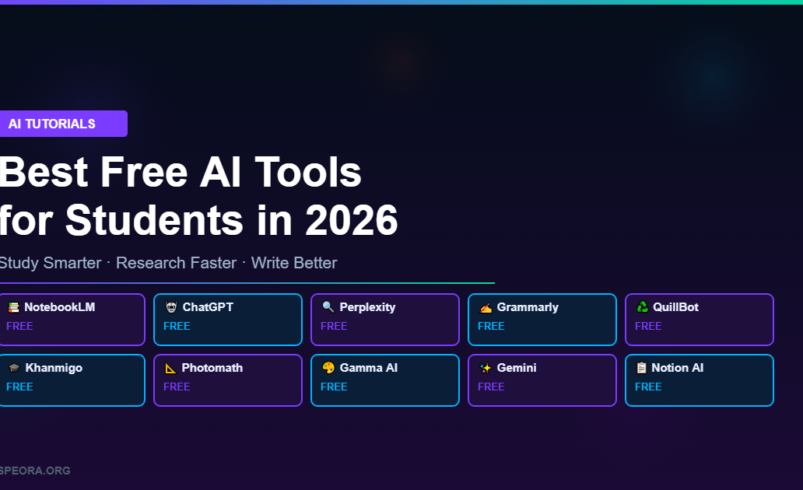
AI is no longer just a buzzword — it’s a study partner. From writing essays and solving math problems to organizing notes and conducting research, free AI tools are helping students work faster and learn better in 2026.
We tested dozens of AI tools and picked the 10 best free options that every student should know about. Whether you’re in high school, college, or grad school, these tools will save you hours every week.
Related: 25 Best Free AI Tools in 2026 (Tested & Ranked)
Quick Comparison Table
| Tool | Best For | Free Plan | Platform |
|---|---|---|---|
| Google Gemini | Research & Summaries | Yes + Student Deal | Web, Mobile |
| ChatGPT | Writing & Brainstorming | Yes | Web, Mobile, Desktop |
| Perplexity AI | Research with Citations | Yes | Web, Mobile |
| NotebookLM | Note Organization | Yes | Web |
| Grammarly | Grammar & Writing | Yes | Browser Extension |
| QuillBot | Paraphrasing | Yes | Web, Extension |
| Khanmigo | AI Tutoring | Yes | Web |
| Photomath | Math Problem Solving | Yes | Mobile |
| Gamma AI | Presentations | Yes | Web |
| Notion AI | Study Planning | Limited | Web, Desktop, Mobile |
1. Google Gemini — Best All-Round Student AI
Best For: Research, real-time answers, and summaries
Free Plan: Yes — plus 12 months of AI Pro free for students
Why Students Love It: Google Gemini connects directly to the web, so your answers are always up-to-date. It integrates with Google Docs, Gmail, and Drive — tools most students already use daily. The free student deal for AI Pro makes it the highest-value free AI tool available in 2026. Perfect for research papers, quick fact-checking, and generating study summaries.
2. ChatGPT — Best for Writing & Brainstorming
Best For: Essay drafts, coding help, brainstorming ideas
Free Plan: Yes
Why Students Love It: ChatGPT remains one of the most versatile AI assistants available. Use it to outline essays, debug code, explain complex concepts in simple terms, or brainstorm project ideas. The free tier gives you access to GPT-4o mini, which handles most student tasks effortlessly. If you’re new to AI tools, this is the best place to start — check out our guide on what AI tools like ChatGPT actually are.
3. Perplexity AI — Best for Research with Sources
Best For: Academic research with inline citations
Free Plan: Yes
Why Students Love It: Perplexity is built for research. Unlike regular chatbots, it provides answers with inline citations from verified sources — exactly what students need for papers and assignments. Ask a question and get a clear answer with links to the original sources. No more scrolling through dozens of Google results to piece together information.
4. Google NotebookLM — Best for Organizing Study Notes
Best For: Turning lectures and papers into interactive study guides
Free Plan: Yes
Why Students Love It: Upload your lecture notes, research papers, or textbook PDFs, and NotebookLM transforms them into a smart study assistant. Ask questions like “Summarize Chapter 4” or “Explain this theory simply” and get instant, accurate answers based on your own materials. It even generates study guides and practice questions automatically.
5. Grammarly — Best for Polishing Your Writing
Best For: Grammar checking, tone adjustment, and clarity
Free Plan: Yes
Why Students Love It: Every student needs a writing assistant, and Grammarly is the gold standard. The free version catches grammar mistakes, suggests better word choices, and helps you adjust tone for different assignments. Install the browser extension and it works everywhere — Google Docs, email, discussion boards. For more AI writing options, see our list of best free AI writing tools in 2026.
6. QuillBot — Best for Paraphrasing & Rewriting
Best For: Rewording sentences while keeping the meaning
Free Plan: Yes
Why Students Love It: QuillBot helps you express ideas in your own words without accidentally plagiarizing. Paste a sentence and get multiple rewritten versions that maintain the original meaning. The free plan includes the paraphraser, grammar checker, and summarizer — everything a student needs to refine their writing quickly.
7. Khanmigo — Best Free AI Tutor
Best For: Step-by-step learning and problem solving
Free Plan: Yes
Why Students Love It: Khanmigo is Khan Academy’s AI tutor that uses the Socratic method — it asks guiding questions instead of handing you answers. This helps you actually understand concepts rather than just copying solutions. Available for math, science, humanities, and more. It’s like having a patient tutor available 24/7.
8. Photomath — Best for Solving Math Problems
Best For: Step-by-step math solutions
Free Plan: Yes
Why Students Love It: Point your phone camera at any math problem and Photomath solves it with detailed step-by-step explanations. From basic algebra to calculus, it covers the full range of math courses. The explanations help you understand the “why” behind each step, making it a learning tool — not just an answer machine.
9. Gamma AI — Best for Creating Presentations
Best For: Quick, professional slide decks
Free Plan: Yes
Why Students Love It: Dreading your next class presentation? Gamma AI generates polished slide decks from a simple text prompt in seconds. Describe your topic and it creates a complete presentation with structure, visuals, and talking points. You can edit everything afterward, making it a massive time-saver for group projects and class presentations.
10. Notion AI — Best for Study Planning & Organization
Best For: Task management, note summaries, and study schedules
Free Plan: Limited (some AI features require Pro)
Why Students Love It: Notion is already a favorite among students for note-taking and project management. The AI add-on takes it further — summarize long notes, generate action items from meeting notes, create study schedules, and brainstorm essay outlines. The free tier gives you enough AI credits to see how it fits into your workflow.
How to Get the Most Out of AI as a Student
AI tools work best when you use them as assistants, not replacements. Here are a few tips to study smarter with AI in 2026:
Use AI for first drafts, not final submissions. Let ChatGPT or Gemini help you outline ideas, then rewrite in your own voice. Always verify AI-generated information. Use Perplexity’s citations to cross-check facts before including them in papers. Combine tools for a complete workflow. Use NotebookLM for notes, Grammarly for editing, and Gamma for presentations — each tool excels at a different stage. Check your school’s AI policy. Most universities now have clear guidelines on AI use. Make sure you understand what’s allowed before submitting AI-assisted work.
Looking for more AI tools beyond studying? Browse our complete list of 25 best free AI tools in 2026, or explore the best free AI image generators for your creative projects.
FAQ
Q: What is the best free AI tool for students?
Google Gemini is the best overall pick thanks to its free student deal, web connectivity, and Google Workspace integration. ChatGPT is a close second for writing and brainstorming.
Q: Is it cheating to use AI tools for homework?
It depends on how you use them and your school’s policy. Using AI to brainstorm, organize, or check grammar is generally acceptable. Submitting AI-generated work as your own is not. Always check your institution’s guidelines.
Q: Can AI tools replace a tutor?
AI tutors like Khanmigo are excellent supplements, but they work best alongside human instruction. They’re available 24/7 and infinitely patient, making them ideal for practice and review.
Q: Are these AI tools safe for students to use?
Yes, all tools listed here are from established companies with clear privacy policies. However, avoid sharing personal information or sensitive data with any AI chatbot. For younger students, parental guidance is recommended.
📚 Related Articles You’ll Love
Explore more AI tool guides on Speora:
- 🖼️ Best Free AI Image Generators in 2026 — Create stunning visuals for your assignments and projects for free.
- 🎬 Best AI Tools for Content Creators in 2026 — Ready to turn your skills into content? These tools will help.
- ✍️ Best Free AI Writing Tools (No Signup Required) — Write better essays and reports with these zero-friction tools.
- 🤖 What Are AI Tools Like ChatGPT? — New to AI? Start here for a beginner-friendly explainer.
- 🏆 25 Best Free AI Tools in 2026 (Tested & Ranked) — The ultimate master list of free AI tools across every category.
- 📈 Mastering Social Media Marketing in the AI Era — Use AI to grow your personal brand while studying.